Everything behind the summary in the
README: how to pick
an argon2id profile and why aggressive is the right default, how to change the
KDF on a volume that already exists, why nothing here uses pbkdf2, what
FileVault does with the same disk, how much your passphrase actually
contributes, and the separate rules that apply to a volume GRUB itself must
unlock.
Choosing an argon2id profile
There is no weak choice here. All three profiles are stronger than what
cryptsetup picks for itself — that is the floor, not the target, and it is
checked at run time on the machine being encrypted rather than assumed from a
table. fast means fast relative to the other two, not "cheap": it is
deliberately pinned just above stock, never below it.
Because you wait for it every time you start the machine, the installer asks you
to pick one of three profiles. It benchmarks your machine first and shows an
estimate for each from your own hardware, not someone else's. Above the memory
cryptsetup benchmark can allocate on the spot, the figure is scaled from a
smaller measurement rather than measured outright, and every figure shifts with
system load — at boot the machine is idle, so real unlocks land at the fast end:
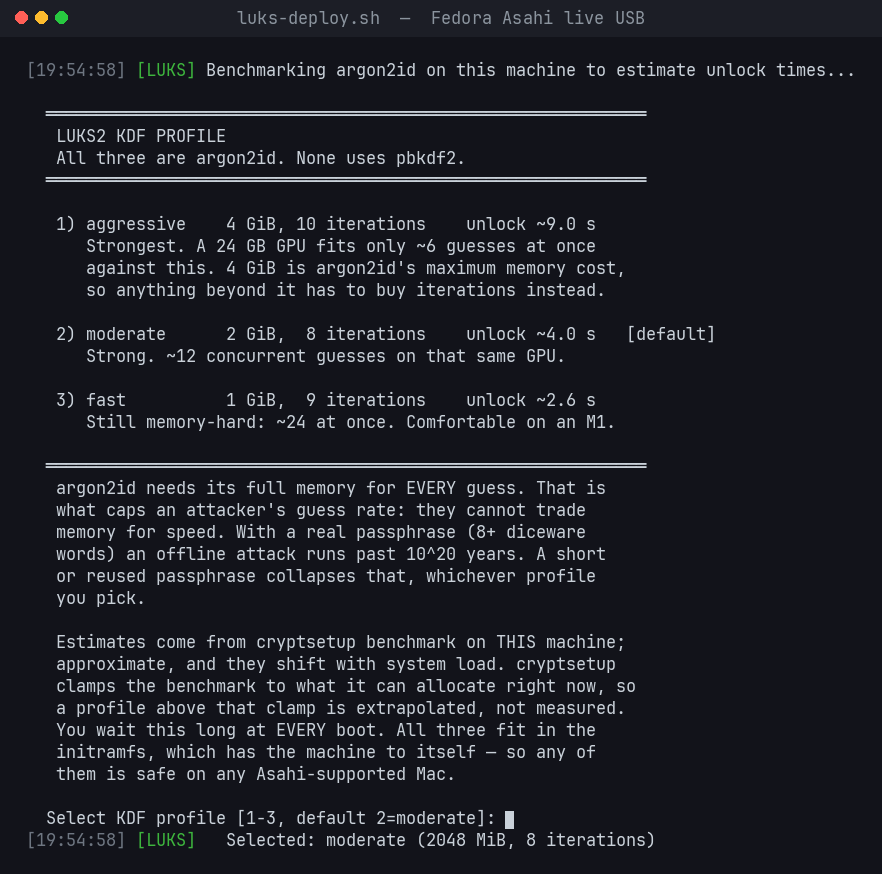
Times shown are from an M2 Max. Your machine is benchmarked at run time, so the numbers you see will be your own.
| Profile | Memory | Iterations | Threads | Unlock, M2 Max | vs stock |
|---|---|---|---|---|---|
aggressive |
4 GiB | 10 | 4 | 9.5 s (measured) | 5x |
moderate (default) |
2 GiB | 8 | 4 | ~3.8 s | 2x |
fast |
1 GiB | 9 | 4 | ~2.1 s | 1.125x |
Only aggressive is measured — from the boot journal, the gap between
systemd-cryptsetup taking the passphrase and the volume opening. The other two
scale from it at ~0.24 s per GiB-pass. The screenshot above shows a live
cryptsetup benchmark run instead, which is a different basis and jitters with
load, so its numbers sit slightly higher.
"vs stock" is work (memory x iterations) against what cryptsetup picks on
this machine unaided — 1 GiB x 8, its --iter-time default of 2000 ms. Every
profile is above 1.0x by construction, and a runtime guard enforces it (below).
All three are argon2id — none uses pbkdf2. Memory cost only has to be allocatable in the initramfs, which has the machine to itself, so any profile is safe on any Asahi-supported Mac including an 8 GiB M1.
The case for aggressive — and for paranoid after it
Pick aggressive unless you have a reason not to. Here is the reason to.
You pay the KDF once per boot. The attacker pays it once per guess. An
unlock is not a screen unlock or a wake from sleep — it is the passphrase
prompt at power-on, and nothing else. On an M2 Max aggressive costs 9.5 s
there; boot once a day and that is under an hour a year, and the disk runs at
full AES-XTS speed for every second in between, because argon2id never runs
again until the next boot. An attacker with an image of your disk pays those
same 9.5 s — on their hardware, at their scale — for every single guess, and
against a 40-bit human-chosen passphrase they need about a trillion of them.
That asymmetry is the whole product, and aggressive is where it is
steepest: 5× the work of a stock luksFormat (1 GiB × 8 on this
machine), 2.5× moderate, 4.4× fast. In the table below that is the
difference between 28 years and, for stock, about six.
4 GiB is the ceiling, and aggressive sits on it. Memory is the only thing
that makes an attacker's silicon expensive — a 24 GB GPU fits about six
concurrent 4 GiB guesses, twelve at 2 GiB, twenty-four at 1 GiB, thousands
against a memory-free loop. cryptsetup refuses argon2id memory above
4 GiB, so no setting anywhere makes a guess dearer in memory than
aggressive already does. Every profile below it hands the attacker back
some of that parallelism for a few seconds of your boot.
paranoid is the last 20 %. Past the memory ceiling only time raises the
price, and paranoid (4 GiB × 12) raises it 20 % on every guess, forever, for
about two more seconds per boot. It is not in the deploy menu on purpose — it
is a decision to make after the fact, with luks-tune.sh, once you have
lived with aggressive and found the wait invisible. Most people do.
Who this is for. A laptop that leaves the house. A passphrase you chose yourself rather than rolled with dice — the rows where the KDF, not the passphrase, decides the outcome. Anyone who will never come back to re-cost the keyslot: the KDF you ship is the KDF the thief meets, and it costs nothing to make it the strongest one available. Above six diceware words every tier here is past cosmic time and the choice stops mattering; below that it is the largest single security factor you control with one menu keystroke.
argon2id is memory-bandwidth-bound, so a base M1 is slower than an M2 Max for identical parameters — which is exactly why the installer measures your hardware rather than assuming.
Non-interactive selection, for scripted or fleet deployments:
sudo LUKS_PROFILE=fast ./bin/luks-deploy.sh                     # a named profile
sudo LUKS_PBKDF_MEMORY=3145728 LUKS_PBKDF_ITER=8 ./bin/luks-deploy.sh   # fully custom (3 GiB x 8)
Setting any LUKS_PBKDF_* variable pins the parameters and skips the menu.
The fast profile is a hard floor. Custom parameters below it — less
than 1 GiB of memory, or less total work (memory x iterations) than
1 GiB x 9 — are refused outright. There is no acknowledgement flag, and the
floor also catches the classic typo (LUKS_PBKDF_MEMORY=1048 for 1048576).
AsahiLocker hardens; it never weakens. It does not write a KDF below the
floor, and luks-tune.sh does not re-cost a keyslot to anything cheaper than
the keyslot already has. If you genuinely want a weaker keyslot, that is a
manual cryptsetup luksConvertKey you run yourself, outside this tool — no
script here will do it for you.
The two conditions are separate because they fail differently: dropping below
1 GiB loses the memory-hardness that is the entire point, and dropping total
work below fast is cheaper per guess however you trade the two off.
If you genuinely want a cheaper KDF, run cryptsetup luksConvertKey yourself.
This script will not write one for you.
And a runtime guard on top of that. Before formatting, the script reads
what cryptsetup itself would have chosen on this machine (argon2id at its
default memory with iterations auto-tuned to --iter-time, 2000 ms) and
refuses to ship anything weaker:
- a named profile below stock has its iteration count raised to 25% past stock, and says so;
-
pinned
LUKS_PBKDF_*numbers below stock are fatal — the operator chose exact values, and silently changing them would break the fleet reproducibility that pinning exists to provide.
This matters because the profiles are fixed numbers while stock is a fixed time: on hardware faster than the profiles assume, stock climbs and a fixed profile can quietly fall behind it. The benchmark is sampled and the lowest reading wins, because reading stock too low only makes the guard a no-op, while reading it too high would inflate your unlock latency on every boot forever.
Why the floor is 1 GiB and not "whatever cryptsetup picks". cryptsetup sizes
argon2id memory against the RAM it can allocate at that moment. Inside a
distro installer's live environment that is not much, and the result is a header
you keep for the life of the machine. Measured across several x86 installs, the
graphical installers produced argon2id memory costs of roughly 350-600 MiB
— and sha256 — which then had to be corrected by hand afterwards with
luksConvertKey. AsahiLocker pins the parameters instead: --pbkdf argon2id,
--hash sha512, --cipher aes-xts-plain64, --key-size 512, and an explicit
--pbkdf-memory/--pbkdf-force-iterations, so the header never depends on how
much RAM happened to be free while it was being written.
The partition menus can be pinned the same way as the KDF (each pinned device
is still fstype-checked and cross-checked against the target's own fstab, and
the typed ENCRYPT confirmation still applies):
sudo LUKS_TARGET_ROOT=/dev/nvme0n1p6 LUKS_TARGET_BOOT=/dev/nvme0n1p5 \
     LUKS_TARGET_EFI=/dev/nvme0n1p4 ./bin/luks-deploy.sh
Fully hands-off (fleet imaging, automated testing): LUKS_PASSPHRASE_FILE=<path>
reads the passphrase from a file — its exact bytes, no trailing newline — and is
used for encrypt, resume, unlock, and as the existing key when enrolling the
recovery key. LUKS_MAPPER_NAME=<name> changes the device-mapper name (default
fedora_crypt; the companion scripts auto-detect a custom name from the booted
system).
Changing the KDF on a volume that already exists
Profiles apply at format time only. A header keeps whatever it was built
with, so changing a profile does nothing to a disk you already encrypted — but
you are not stuck with what you picked: cryptsetup luksConvertKey re-wraps a
keyslot's key under new argon2id parameters in place. It does not change
your passphrase, does not re-encrypt anything, and does not touch a single
byte of filesystem data. It takes seconds.
Read what a volume actually uses first:
sudo cryptsetup luksDump /dev/nvme0n1p6Under each keyslot you get PBKDF:, Memory: (in KiB), Time cost: (the
iteration count) and Threads:. Every keyslot carries its own parameters — a
passphrase slot and a keyfile slot on the same volume are commonly different.
There is an ncurses front-end for all of this if you would rather not hand-type
the parameters — bin/luks-tune.sh offers the four tiers
below plus a custom option, shows the measured unlock time and the strength
graph below for whatever you pick before you commit, and takes the header
backup for you:
sudo ./bin/luks-tune.sh              # interactive
sudo ./bin/luks-tune.sh --dry-run    # show the command, change nothing
To do it by hand instead: back the header up first, and keep the backup until a successful boot confirms the new parameters — a keyslot is the only copy of your key, wrapped:
sudo cryptsetup luksHeaderBackup /dev/nvme0n1p6 \
     --header-backup-file ~/luks-header-before.bin
Then pick a tier. Each command converts the keyslot your passphrase opens
without changing the passphrase; add -S <n> to target a specific slot,
and repeat per slot you want re-costed.
# fast — 1 GiB, 9 iterations          (~2.1 s on an M2 Max; 12.5% more
#                                      work than cryptsetup unaided here,
#                                      which picks 1 GiB x 8)
sudo cryptsetup luksConvertKey --hash sha512 --pbkdf argon2id \
     --pbkdf-memory 1048576 --pbkdf-force-iterations 9 --pbkdf-parallel 4 \
     /dev/nvme0n1p6

# moderate — 2 GiB, 8 iterations      (~3.8 s)   ← the shipped default
sudo cryptsetup luksConvertKey --hash sha512 --pbkdf argon2id \
     --pbkdf-memory 2097152 --pbkdf-force-iterations 8 --pbkdf-parallel 4 \
     /dev/nvme0n1p6

# aggressive — 4 GiB, 10 iterations   (~9.5 s, measured)
sudo cryptsetup luksConvertKey --hash sha512 --pbkdf argon2id \
     --pbkdf-memory 4194304 --pbkdf-force-iterations 10 --pbkdf-parallel 4 \
     /dev/nvme0n1p6

# paranoid — 4 GiB, 12 iterations     (~11.4 s)
sudo cryptsetup luksConvertKey --hash sha512 --pbkdf argon2id \
     --pbkdf-memory 4194304 --pbkdf-force-iterations 12 --pbkdf-parallel 4 \
     /dev/nvme0n1p6
Two things that trip people up:
-
--hash sha512is not optional here.luksConvertKeyrewrites the keyslot area, so it re-runs the anti-forensic split and re-stamps that slot's AF hash. Leave--hashoff and cryptsetup substitutes its compiled-in default ofsha256— re-costing a slot AsahiLocker formatted would then lower its AF hash while raising its argon2id cost. The volume-key digest is a separate field, fixed atluksFormattime;luksConvertKeycannot change it either way. -
--pbkdf-force-iterationsdisables cryptsetup's time benchmarking. Left off, cryptsetup auto-tunes the iteration count to land near--iter-time(2000 ms by default). That is why a stock 1 GiB volume unlocks in about two seconds while these profiles take longer — the memory figure is the same, the iteration count is not. -
--pbkdf-memoryis in KiB, not MiB or GiB — and4194304(4 GiB) is the hard maximum:cryptsetuprefuses anything above it. Past that ceiling only the iteration count can raise the cost, which is the entire difference betweenaggressiveandparanoid.
What paranoid actually buys you
Paired with a properly generated passphrase, it takes offline brute force off the table completely — not "makes it hard", removes it as an avenue. Against a fleet of a thousand top-end GPUs, each running the six concurrent guesses that 4 GiB per guess allows, at the per-guess cost measured on real hardware:
                                  time to search half the keyspace
                                  (log scale — each block ≈ 1.5 orders of magnitude)

 weak / reused password  ~30 bit  ▏                          12 days
 human-chosen "strong"   ~40 bit  █                          33 years
 6 diceware words         77 bit  ████████                   10^13 years
 8 diceware words        103 bit  ██████████████             10^20 years
 10 diceware words       129 bit  ███████████████████        10^28 years
 12 diceware words       155 bit  ████████████████████████   10^36 years

 the universe is         ~10^10 years old  ────────┤ everything below this line
                                                     already outlives it
No budget closes that gap. Money buys an attacker hardware, and hardware scales the cost linearly while your passphrase scales the keyspace exponentially — adding two diceware words costs you four seconds of typing and multiplies their work by roughly seven million. A national intelligence service with an unlimited budget is in exactly the same position as a laptop thief, several dozen orders of magnitude short, and no appropriation changes the arithmetic.
Which is precisely why nobody capable would try. An adversary at that level does not brute-force argon2id; they go around it. They take the passphrase from you, or from a keylogger, or from a camera above your desk. They image the machine while it is running, where the key sits in RAM. They find the backup you made to an unencrypted disk. Set your KDF so that brute force is hopeless — it already is, at every tier here — and then spend your remaining attention on the attacks that actually work. See Risks.
That top row is the one to look at twice. At ~30 bits, paranoid buys you
twelve days. The KDF cannot rescue a weak passphrase, and no tier on this page
tries to pretend otherwise — see
Your passphrase is the other half.
Using the graph to choose
Read it in both directions. If your passphrase is 8 diceware words or better,
every tier already puts you past 10^13 years, so dropping to fast costs you
nothing that matters and saves eight seconds at every single boot — a real,
daily saving against a difference measured in orders of magnitude you will never
reach. If your passphrase is shorter than you would like and you are not ready
to change it, moving up to paranoid buys you the largest factor still
available, though the row above shows how little that is compared with simply
adding words.
Never use pbkdf2
Not as a fallback. Not to save memory. Not to shave a second off your boot.
luksFormat still accepts it and LUKS1 defaulted to it, so it is easy to end up
with by accident — treat that as a defect to fix, not a setting to keep.
pbkdf2 is not broken. It is obsolete, which is worse, because broken things get ripped out and obsolete things linger in defaults for twenty-six years.
Understand what it actually is. pbkdf2 is a for loop. That is the entire idea:
take something cheap, do it a great many times, and hope the attacker finds the
repetition as tedious as you do. It was standardised in RFC 2898, in the year
2000, when the threat model was a person with a computer roughly like yours.
That assumption died the day general-purpose GPUs shipped, and pbkdf2 has had no
answer since, because it has nothing to spend except time — and time is the one
resource an attacker buys at a bulk discount and you pay for at retail.
It has no memory requirement at all. None. That single omission is the whole catastrophe. Memory is what makes an attacker's silicon expensive; a KDF that asks for none is a KDF that fits thousands of copies of itself onto one graphics card, and asks each one for nothing but arithmetic — the exact thing that card was built to do ten thousand times over. argon2id at 4 GiB tells a 24 GB GPU it may run six guesses. pbkdf2 tells it to help itself.
So you are on a treadmill, and it is rigged. Every iteration you add costs you, personally, at every single boot, on the hardware you already own. It costs your attacker nothing they cannot buy back with next year's card — and they will, while your boot time stays exactly where it is. You are the only participant in this arrangement who pays more over time. Raising pbkdf2's iteration count is not a defence; it is a subscription.
The cryptographic community reached this conclusion publicly and unanimously over a decade ago. The Password Hashing Competition ran from 2013 to 2015 for precisely this reason — that what everyone was using had aged out — and Argon2 won it. That was eleven years ago. Every argument for pbkdf2 on a new volume in 2026 is an argument that has already been had, in public, and lost.
Concretely, at the parameters below and against a human-chosen password: 28 years with argon2id, ten days with pbkdf2. That is not a tuning preference. That is the difference between a stolen laptop that keeps your life private and one that hands it over inside a fortnight.
This tool selects argon2id and only argon2id. No profile offers pbkdf2, no
environment variable exposes it, no menu hides it behind an "advanced" tab, and
there is no supported configuration in which it is the right answer. If
luksDump shows PBKDF: pbkdf2 on a volume you care about, that volume is
running on a twenty-six-year-old assumption about who is attacking it. Re-cost
that keyslot with the luksConvertKey command above, today.
How this compares with FileVault — the KDF macOS gives the same disk
The macOS install on the other half of this disk is protected by FileVault, so the comparison is not academic: the same passphrase habits, the same NVMe, two key-derivation designs. They are different in kind, and it is worth being exact about which one is stronger at what.
| FileVault (macOS on Apple Silicon) | AsahiLocker (LUKS2 on Fedora Asahi Remix) | |
|---|---|---|
| Key derivation |
PBKDF2 with SHA-256 — a for loop, the 2000 design, no memory cost; documented at 41,000 iterations in the CoreStorage era (Choudary, Grobert and Metz, Infiltrate the Vault, 2012), and Apple has published no figure since |
argon2id (RFC 9106, the Password Hashing Competition winner): 1–4 GiB of memory per guess, 8–10 passes, sha512 everywhere — the parameters in the table above |
| Where the password is stretched | Inside the Secure Enclave, entangled with the chip's unique ID and rate-limited there; the derived key never exists outside that silicon | In the initramfs, on the CPU, from what is on the disk — nothing else is involved |
| An attacker with the disk alone | Cannot start: without that specific Secure Enclave the key hierarchy is unreachable, however weak the password. Every guess has to run on the machine, throttled by the hardware | Can start at once: the LUKS header holds everything, and the only thing standing between a guess and the data is argon2id's cost per guess — 4 GiB and seconds of memory-bound work, on hardware of the attacker's choosing |
| An attacker with the machine | The Secure Enclave's throttling, and behind it a PBKDF2 that a GPU would eat in days if it ever got to run offline (the pbkdf2 column is what that looks like) | Exactly the disk-alone case: the machine adds nothing, and takes nothing away |
| What carries a weak passphrase | The hardware. Apple's design assumes the passphrase is weak and makes the silicon carry it | Nothing. AsahiLocker cannot reach the Secure Enclave (see the FAQ), so the KDF is the whole wall, and the table above is the price list |
| What carries a strong passphrase | Both — and past six diceware words the hardware is a formality | The passphrase, already past cosmic time at the same six words; the KDF decides the top rows of the table, not the bottom ones |
| If the hardware promise ever fails | Falls back to PBKDF2 alone — the weak KDF, offline. A Secure Enclave flaw, a signing key, a legal order to a single vendor: the design has one load-bearing part, and it is closed | Nothing to fall back from: the design was never resting on hardware. A memory-hard KDF and a passphrase are the same wall on every machine, today and after the machine is replaced |
| Intel Mac without a T2 chip | PBKDF2 alone, offline — the weak case, with no hardware in front of it | Unchanged |
So, said plainly: as a key-derivation function, AsahiLocker's argon2id
exceeds FileVault's PBKDF2 by orders of magnitude — the same way it exceeds
pbkdf2 on a Linux volume, for the same reasons, in the same table. Apple knows
this and does not rely on PBKDF2; it relies on the Secure Enclave to make the
weak function unreachable. That is a legitimate design, and one Linux on this
hardware cannot borrow. It is also a design with a single point of trust that
is not yours. AsahiLocker takes the other road: make each guess genuinely
expensive on any silicon, and let the passphrase do the rest. Which is why the
passphrase advice in this document is not decoration — under Linux it is the
Secure Enclave you do not have. Choose it with diceware, six words or more,
and both columns of every table here read past the age of the universe.
Your passphrase is the other half
The KDF sets the price of a single guess. Your passphrase sets how many guesses
are needed. Neither one carries the volume alone — a 4 GiB argon2id keyslot
protecting hunter2 falls in an afternoon, and a magnificent passphrase behind
a cheap KDF is a lot cheaper to attack than you would like.
The numbers below assume the aggressive profile (4 GiB, 10 iterations) and a
well-funded attacker: 1,000 top-end GPUs, 24 GiB of VRAM each, each running
as many concurrent guesses as 4 GiB per guess leaves room for — about six — at
the same per-guess cost this tool measures on your own machine. That is roughly
630 guesses per second for the whole fleet. Times are to search half the
keyspace, and they are orders of magnitude, not predictions.
| Passphrase | Entropy | Time to break | What has happened by then |
|---|---|---|---|
| 6 diceware words | 77 bits | ~10^13 years | A thousand times the present age of the universe. The last red dwarfs are still burning — just. |
| 7 diceware words | 90 bits | ~10^16 years | Star formation ended long ago. Nothing is left but cooling remnants. |
| 8 diceware words | 103 bits | ~10^20 years | Galaxies have dynamically evaporated; the remnants drift alone in the dark. |
| 10 diceware words | 129 bits | ~10^28 years | Approaching the era in which protons themselves may decay. |
| 11 diceware words | 142 bits | ~10^32 years | Ordinary matter is dissolving, if protons decay at all. |
For scale, the universe is about 1.4 × 10^10 years old. Even the weakest row here outlives it by a factor of a thousand. This is why the argument is over passphrase generation, never over adding another symbol to a short one.
What a weak KDF costs you — the pbkdf2 column
Same fleet, same passphrases, but with the keyslot wrapped in pbkdf2 instead. pbkdf2 needs essentially no memory per guess, so VRAM stops limiting how many guesses run at once and the attacker's rate is bounded only by raw arithmetic. The column below assumes they get 1000× the guess rate — deliberately conservative for a GPU fleet, since the real gap grows with every new card:
| Passphrase | Bits | argon2id 4 GiB | pbkdf2 |
|---|---|---|---|
| a human-chosen password | 40 | 28 years | 10 days |
| a good non-diceware passphrase | 60 | 10^7 years | 10^4 years |
| 6 diceware words | 77 | 10^13 years | 10^10 years |
| 8 diceware words | 103 | 10^20 years | 10^17 years |
| 10 diceware words | 129 | 10^28 years | 10^25 years |
Read the bottom rows and the top row differently, because they say different things. At high entropy both are past cosmic time — argon2id is not what saves you there, your passphrase is. The KDF decides the outcome in the top row, where most real passphrases actually live: twenty-eight years versus ten days is the difference between a laptop that stays private and one that does not.
A 1000× cheaper KDF is exactly equivalent to deleting log2(1000) ≈ 10 bits
from your passphrase — near enough one whole diceware word, silently, after you
chose it. That is the entire argument, and it is why there is no pbkdf2 option
in this tool.
Quantum computing
Two algorithms matter, and only one of them applies here.
Shor's algorithm does not touch this. It breaks RSA and elliptic-curve cryptography by exploiting their algebraic structure. LUKS uses none of that — AES-XTS with a 512-bit key and argon2id have no structure for Shor to attack. Nothing in this tool is on the "harvest now, decrypt later" list in the way a TLS session key or an encrypted email is.
Grover's algorithm does apply, and it halves your effective entropy. It searches an unstructured keyspace in √N instead of N, so a 103-bit passphrase behaves like a 51-bit one against an idealised quantum attacker. Applying that worst case to the table above:
| Passphrase | Bits | Effective vs. Grover | Time at 4 GiB argon2id |
|---|---|---|---|
| 6 diceware words | 77 | 38 | 10 years |
| 8 diceware words | 103 | 51 | 10^5 years |
| 10 diceware words | 129 | 64 | 10^9 years |
That is the case for eight words as a floor and ten or eleven for anything you expect to matter in thirty years. Six words is comfortable today and thin under a machine that does not exist yet.
Two honest caveats, because this table is a ceiling and not a forecast. Grover requires evaluating the entire KDF in superposition — a fault-tolerant quantum computer would have to run argon2id at 4 GiB coherently, and memory-hard functions are about the most hostile possible target for that; nothing close to it is on any roadmap. Grover also parallelises badly: its speedup is sequential, so a thousand quantum computers do not give you a thousandfold gain the way a thousand GPUs do. Treat the middle column as a reason to buy entropy headroom while it costs you two extra words, not as a prediction that anyone will do this.
Use diceware, and generate it randomly. The EFF long wordlist holds 7,776
words — exactly five six-sided dice per word, log2(7776) = 12.92 bits each.
Roll real dice if you have them; five rolls select one word by lookup.
Without dice, use a CSPRNG explicitly — do not let a shell pick for you. Fetch the list, check it, then draw from it:
# EFF long wordlist: 7,776 lines of "11111<TAB>abacus"
curl -O https://www.eff.org/files/2016/07/18/eff_large_wordlist.txt

# Verify it before trusting it for entropy
echo 'addd35536511597a02fa0a9ff1e5284677b8883b83e986e43f15a3db996b903e  eff_large_wordlist.txt' \
    | sha256sum -c

# Eight words, drawn with replacement, from the kernel CSPRNG
shuf -r -n 8 --random-source=/dev/urandom eff_large_wordlist.txt | cut -f2 | paste -sd' '
Two details in that command are load-bearing:
-
-rdraws with replacement. Diceware specifies independent rolls, so a word may legitimately repeat and each one contributes the full 12.92 bits. Without-r,shufsamples without replacement — a different model, and one that cannot produce the repeat it sometimes should. - Check the list. A truncated or substituted wordlist lowers your entropy silently: the passphrase still looks like eight ordinary words. A list cut to its first 100 lines yields 53 bits, not 103, and nothing in the output says so.
Eight words is a sound default for a machine you use daily. Ten or eleven is appropriate for a volume you expect to outlive the hardware.
The rules that actually matter:
- Generated, not chosen. Entropy counts only if the selection was random. Words you picked yourself because they were memorable carry a small fraction of the bits their length suggests, because an attacker models the same preferences you have.
- Never reused. Not your login password, not your password manager's master passphrase, not a variation on either. A keyslot passphrase that appears in any breach corpus is worth zero bits regardless of its length.
-
Length beats complexity.
correct horse battery staplestyle beatsXk7$q!2— more entropy, and vastly easier to type correctly. - Stay in plain ASCII. You type this at a bare console before any keymap is loaded, so a layout-dependent or non-ASCII character may be impossible to enter at the boot prompt even though it worked when you set it. Lowercase words and spaces are safe everywhere, which is a real practical argument for diceware over symbol soup on a boot passphrase specifically.
-
Watch Caps Lock.
cryptsetupconfirms a new passphrase by asking twice, so an inverted one verifies happily and fails only at the next boot. The deploy script warns when the kernel reports Caps Lock on at the confirmation gate. - Write it down until it is memorised. The realistic way to lose a correctly-configured encrypted volume is forgetting the passphrase, not someone breaking it. Paper in a safe beats a fifth backup of the header. Enrol a recovery key in a second keyslot as well — see Recovery key.
GRUB and argon2id
None of this constrains the root volume, because
GRUB never unlocks it — the initramfs does. It only matters if you have some
other volume that GRUB itself must unlock — for example the experimental
encrypted-/boot research, which runs a self-built GRUB 2.14 with argon2id
(see docs/BOOT-ENCRYPTION-STATUS.md).
For those volumes: never use 4 GiB — a 32-bit overflow in GRUB's
argon2_init wraps the allocation size to zero, so it proceeds instead of
rejecting the parameters. That rule is unconditional.
Below that, the usable maximum is set by the firmware, not by GRUB, and has to be measured per platform. On x86 vendor UEFI more than 1 GiB has never worked — that firmware leaves GRUB too little heap, which is where the usual "GRUB caps at 1 GiB" comes from. Under Asahi's U-Boot it is not the same number: 2 GiB is measured working on an M2 Max. Use 1 GiB as the portable default; treat more as opt-in and measured. An allocation failure here means the machine does not boot. GRUB 2.12 (current in Fedora 44) has no argon2 support at all.
Do not answer any of that by downgrading the volume to pbkdf2 — argon2id at 1 GiB is memory-hard, pbkdf2 is not, and the gap matters far more than the memory cost does.
← Back to the full guide: encrypt Fedora Asahi Remix with LUKS2, in place